


Welcome to the Cloud Computing Skill Lab
Department of Computer Science & Engineering · Channabasaveshwara Institute of Technology, Gubbi
Visvesvaraya Technological University (VTU) has made Skill Labs mandatory for all students admitted under the 2025 Scheme and later. Every student must complete a set number of Skill Labs, each carrying one (01) credit, before graduating.
CIT, Gubbi offers this Skill Lab under its VTU-approved Skill Centre, “Creativity in Engineering – Computational Thinking – Cloud Computing Lab”. What makes it special is that the entire course runs on CIT-Cloud — the Institute's own private cloud, built on an enterprise-class server using only free and open-source software.
You will not just use a cloud — you will see how one is built and run: virtual machines, tenants and quotas, virtual networks, block and object storage, containers, Kubernetes, Infrastructure-as-Code, CI/CD pipelines and monitoring. Every exercise is mapped to its equivalent service on AWS, Azure and Google Cloud, so your skills transfer directly to industry platforms.
What makes this Skill Lab unique
A Real Cloud on Campus
Work on CIT-Cloud, hosted on a 64-thread Xeon server with 187 GB RAM and an NVIDIA GPU — not a simulator.
100% Hands-On
12 guided lab programs, 6 hours of guided practice and a team mini project — you build everything yourself.
No Hidden Costs
No public-cloud account, credit card or paid licence required. All tools are free and open-source.
Industry Mapped
Every tool maps to AWS, Azure and GCP services, preparing you for cloud and DevOps careers.
Inside CIT-Cloud: how your lab environment is built
How to join — in four simple steps
Pay the Fee
Pay Rs. 2,000/- at the Accounts Section, CIT Gubbi and collect your fee receipt.
Register Online
Fill in the registration form with your details and the fee receipt number and date.
Get Confirmation
Seats are confirmed on a first-come, first-served basis (50 per batch). Batch dates are communicated to you.
Start Learning
On Day 1 you receive your personal CIT-Cloud credentials and begin hands-on work.
Why This Skill Lab Matters to You
Earn your mandatory VTU credit — and leave with skills that employers actively look for.
Mandatory for Your Degree
VTU requires five Skill Labs (four for lateral entry) to complete your B.E./B.Tech. This lab earns you one full credit, reflected in your final semester grade card.
Cloud Is Everywhere
Almost every modern application — banking, e-commerce, streaming, AI — runs on the cloud. Cloud skills are valuable to every branch of engineering, not just CSE.
Learn How a Cloud Really Works
Public clouds hide what happens inside. On CIT-Cloud you see and understand every layer — hypervisor, tenants, storage, networks and orchestration.
Industry-Standard Tools
Docker, Kubernetes, Terraform-compatible OpenTofu, Ansible, Prometheus and Grafana — the same tools used by cloud and DevOps teams worldwide.
Build a Portfolio
Every program and your team project are stored in your own Git repository — real evidence of your work to show recruiters and in interviews.
Head Start on Certifications
The syllabus builds a strong foundation for AWS Certified Cloud Practitioner, Certified Kubernetes Application Developer (CKAD) and HashiCorp Terraform Associate.
How industry competency is built
Learn the way industry works
- Real infrastructure, real problems: provision, secure, scale, break and recover systems on a live multi-tenant cloud.
- Public-cloud mapping: every exercise is linked to its AWS, Azure and GCP equivalent, so you can work on any platform.
- DevOps workflow: code in Git, automate with pipelines, deploy with Kubernetes and monitor with dashboards — exactly as in a software company.
- Team project: design, build, document and demonstrate a complete cloud solution in a team of three.
- Industry partners: CIT's partner organisations support the Skill Lab with training, expert sessions, internship and job support.
Career roles this prepares you for
Our industry partners
Role of partners: training, internship support, job support and research & development.
The tools you learn — and where industry uses them
| What you learn | Tool on CIT-Cloud | Equivalent in industry public clouds |
|---|---|---|
| Compute virtualisation & virtual machines | KVM, LXD | Amazon EC2, Azure Virtual Machines, Google Compute Engine |
| Block storage, snapshots & images | ZFS volumes via LXD | Amazon EBS & AMIs, Azure Managed Disks |
| Virtual networks & firewalls | LXD networks, ACLs, ufw | AWS VPC & Security Groups, Azure VNet & NSG |
| Containers & registry | Docker, Gitea Registry | Amazon ECS / ECR, Azure Container Registry, Cloud Run |
| Container orchestration & auto-scaling | Kubernetes (K3s), HPA | Amazon EKS, Azure AKS, Google GKE |
| Object storage | SeaweedFS (S3 API) | Amazon S3, Azure Blob Storage, Google Cloud Storage |
| Infrastructure-as-Code & configuration | OpenTofu, Ansible | Terraform, AWS CloudFormation, Azure ARM/Bicep |
| CI/CD pipelines | Gitea Actions | GitHub Actions, AWS CodePipeline, Azure DevOps |
| Monitoring & alerting | Prometheus, Grafana | Amazon CloudWatch, Azure Monitor |
| Serverless & AI-as-a-Service (advanced) | Knative, Ollama (open LLMs) | AWS Lambda, Amazon Bedrock, Azure OpenAI |
Learning outcomes — after this Skill Lab you will be able to
- Explain cloud service and deployment models and the architecture of a private cloud, and map its components to AWS, Azure and GCP services.
- Provision, configure, secure, snapshot and scale virtual machines, containers, block volumes, networks and S3-compatible object storage.
- Build container images, run multi-container applications, and deploy, scale, auto-scale and roll back workloads on Kubernetes.
- Automate infrastructure and application delivery with Infrastructure-as-Code, configuration management and CI/CD pipelines, and monitor them with dashboards.
- Work in a team to architect, deploy, document and demonstrate a cloud-native application — skills aligned with Cloud Engineer, DevOps and SRE roles.
Syllabus — 30 Hours, One Credit
Concepts, 12 lab programs, guided practice, a team project and evaluation
Course structure at a glance
Part A & B — Orientation and Introductory Concepts (3 hours)
AOrientation, CIT-Cloud Onboarding and Linux Essentials 1 h
- Skill Lab rules, VTU guidelines, evaluation scheme and certification process.
- Linux essentials for cloud work: shell, files, permissions, package management (apt), systemd services, SSH, text editors (nano/vim) and curl.
- Issue of your personal CIT-Cloud credentials: student ID, project access token, port range, S3 access keys and Git account.
B1Cloud Computing Fundamentals 1 h
- Evolution from client-server, grid and utility computing to cloud; the NIST definition and five essential characteristics (on-demand self-service, broad network access, resource pooling, rapid elasticity, measured service).
- Service models: IaaS, PaaS, SaaS and newer models – CaaS, FaaS/serverless, STaaS and AI-as-a-Service; the shared responsibility model.
- Deployment models: public, private, hybrid, community and multi-cloud; when a private cloud is the right choice.
- Virtualisation: Type-1 vs Type-2 hypervisors, KVM, full vs para-virtualisation, VMs vs containers, multi-tenancy.
B2Private Cloud Architecture and Cloud-Native Computing 1 h
- Building blocks of any cloud: compute, storage (block, file, object), networking (virtual networks, NAT, security groups, load balancers), identity and quotas, metering and monitoring.
- Private-cloud platforms: OpenStack, Apache CloudStack, LXD/Incus, Proxmox; a guided tour of the CIT-Cloud architecture.
- Cloud-native concepts: microservices, containers, Kubernetes, DevOps, CI/CD, Infrastructure-as-Code and observability.
- Cloud economics (CapEx vs OpEx), security and compliance, careers and certifications.
- Live demo: launching a VM in seconds, using a SaaS application, and calling a private AI (LLM) API.
Part C — Lab Set: 12 Programs (12 hours)
Each program is a one-hour guided, hands-on session performed individually in your own CIT-Cloud project. Click a program to see its aim, tasks and outcome.
1Getting Started with CIT-Cloud: Self-Service Access, Keys, Quotas and Tenant Isolation IAM
Aim: Access the private cloud through its self-service portal and CLI using key-based authentication, and understand projects, quotas and multi-tenancy.
- Generate an SSH key pair (
ssh-keygen -t ed25519) on the lab PC. - Add CIT-Cloud as a remote using your issued access token and switch to it.
- Log in to the cloud's web portal using the generated client certificate.
- Inspect your project quota and usage, and list the available OS images.
- Try to access another student's project and observe that access is denied (tenant isolation).
Outcome: Portal login, project limits and an access-denied message, with an explanation of how quotas and isolation work.
Tools: LXD UI, lxc, SSH | Industry equivalent: AWS Console, IAM, key pairs
2Launching and Managing Virtual Machines and Containers with cloud-init IaaS – Compute
Aim: Provision compute instances on demand, automate their first-boot configuration and manage their lifecycle.
- Launch a KVM virtual machine with defined CPU and memory limits.
- Launch a system container and compare boot time and memory footprint with the VM.
- Write a cloud-init user-data file that creates a user, installs packages and adds your SSH key.
- Perform lifecycle operations: start, stop, restart, exec, console, info, delete.
- Resize an instance (vertical scaling) and verify with
nprocandfree -h.
Outcome: A running VM and container, a VM-vs-container comparison and automated configuration logs.
Tools: LXD, KVM, cloud-init | Industry equivalent: Amazon EC2 + user data
3Block Storage Volumes, Snapshots, Restore and Custom Images IaaS – Storage
Aim: Use persistent block storage independent of instances, and protect and reuse instance state.
- Create a 5 GiB volume, attach it to the VM, partition, format and mount it, and write data.
- Detach the volume, attach it to another instance and verify the data persists.
- Snapshot an instance, deliberately break a configuration, then restore from the snapshot.
- Publish an instance as a custom image and launch a new instance from it.
- Export an instance backup for use in Program 10.
Outcome: Volume visible across instances, successful snapshot restore and a reusable custom image.
Tools: LXD, ZFS | Industry equivalent: Amazon EBS, snapshots, AMI
4Virtual Networking, Security Rules and Exposing a Service IaaS – Network
Aim: Understand cloud virtual networks, private IP addressing, NAT, DNS and firewall rules (security groups).
- Inspect instance networking: IP addresses, routes, DHCP lease and internal DNS; ping between instances.
- Assign a static private address to the VM.
- Install nginx and configure network ACLs and ufw to allow only SSH and HTTP.
- Access your web server and SSH from the lab PC through your personal port forwards.
- Show that a blocked port is unreachable and explain the traffic path (lab PC → host → NAT → VM).
Outcome: A network diagram of your environment, working HTTP/SSH access and firewall rules.
Tools: Linux bridge, ACL, ufw, proxy devices | Industry equivalent: AWS VPC, Security Groups
5Hosting a Web Application on IaaS: Golden Image and Load-Balanced Clones IaaS – Scaling
Aim: Deploy an application on IaaS, create a reusable golden image and scale out horizontally behind a load balancer.
- Deploy a small Python Flask or PHP web application as a systemd service.
- Publish the configured instance as a golden image and launch two clones from it.
- Configure HAProxy (or nginx) as a round-robin load balancer in front of the clones.
- Stop one clone and observe that the service stays available (health checks and fault tolerance).
Outcome: Responses alternating between clones; availability maintained with one backend down.
Tools: nginx, HAProxy, LXD | Industry equivalent: EC2 + Elastic Load Balancer, AMI
6Containerising an Application with Docker and a Private Container Registry CaaS
Aim: Package an application as a portable container image and distribute it through a private registry.
- Run basic Docker containers (run, ps, logs, exec, stop, rm).
- Write a Dockerfile for a Flask application; build, tag and run it with port mapping and environment variables.
- Apply image best practices: slim base image, .dockerignore and multi-stage builds; compare image sizes.
- Push the image to the private registry and pull it on another instance.
Outcome: Image listed in the private registry and the application running from the pulled image.
Tools: Docker, Gitea registry | Industry equivalent: Amazon ECR, Azure Container Registry
7Multi-Container Application with Docker Compose CaaS
Aim: Define and run a multi-tier application declaratively.
- Write a
compose.yamlfor a web app + Redis (visit counter) + PostgreSQL with named volumes and a private network. - Use environment files, health checks and dependencies; bring the stack up and down.
- Scale the web tier to three replicas behind an nginx container.
- Demonstrate data persistence across container re-creation.
Outcome: A running multi-tier stack with persistent data and a scaled web tier.
Tools: Docker Compose, Redis, PostgreSQL | Industry equivalent: Amazon ECS task definitions
8Container Orchestration with Kubernetes (K3s) PaaS / CaaS
Aim: Deploy and manage containerised workloads on a Kubernetes cluster.
- Install single-node K3s inside your VM; explore nodes, namespaces and system pods with kubectl.
- Deploy your Program 6 image as a Deployment with 3 replicas and expose it as a Service.
- Use a ConfigMap and a Secret; add liveness and readiness probes.
- Delete a pod and observe self-healing; perform a rolling update and a rollback.
Outcome: Deployment manifests and evidence of self-healing, rolling update and rollback.
Tools: K3s, kubectl | Industry equivalent: Amazon EKS, Azure AKS, Google GKE
9Auto-Scaling and Load Balancing on Kubernetes Elasticity
Aim: Demonstrate elasticity — automatically adding and removing capacity as load changes.
- Set CPU requests and limits; verify metrics with
kubectl top. - Create a Horizontal Pod Autoscaler (min 1, max 6 replicas, 50% CPU target).
- Generate load and observe scale-out; stop the load and observe scale-in.
- Expose the application through an Ingress with host/path-based routing.
Outcome: A graph of replica count versus time under load and working Ingress routes.
Tools: HPA, metrics-server, Traefik, hey | Industry equivalent: AWS Auto Scaling, Application Load Balancer
10Object Storage as a Service (S3 API) STaaS
Aim: Use S3-compatible object storage programmatically — the most widely used cloud storage interface.
- Configure the AWS CLI with your issued access keys and the CIT-Cloud S3 endpoint.
- Create a bucket; upload, list, download, copy and delete objects; use prefixes (folders).
- Generate a pre-signed URL to share a file for a limited time.
- Write a Python (boto3) script to upload your Program 3 backup and list bucket contents.
- Host a static website from a bucket and open it in a browser.
Outcome: Bucket listing, a working pre-signed URL and boto3 script output.
Tools: SeaweedFS, AWS CLI, boto3 | Industry equivalent: Amazon S3, Azure Blob Storage
11Infrastructure-as-Code and Configuration Management Automation
Aim: Provision and configure cloud infrastructure repeatably from code instead of manual clicks.
- Write an OpenTofu configuration that creates two instances with a profile and resource limits.
- Run init / plan / apply; inspect the state; change a parameter and re-apply; destroy and re-create.
- Write an Ansible inventory and playbook to install and configure nginx with a templated page on both instances.
- Re-run the playbook to demonstrate idempotency.
Outcome: IaC code in Git, plan/apply output and identically configured servers.
Tools: OpenTofu, Ansible | Industry equivalent: Terraform, AWS CloudFormation
12CI/CD Pipeline and Cloud Monitoring DevOps
Aim: Automate the build and deployment of an application and observe the health of cloud resources.
- Push your code to a Git repository and write a pipeline that builds the Docker image and pushes it to the registry.
- Extend the pipeline to deploy the new image to your Kubernetes cluster on every commit.
- Collect VM metrics (CPU, memory, disk, network) with Prometheus and view them in Grafana dashboards.
- Create a Grafana alert (e.g. CPU > 80% for 2 minutes) and trigger it with a load test.
Outcome: A successful pipeline run, automatic application updates, and a dashboard with a working alert.
Tools: Gitea Actions, Prometheus, Grafana | Industry equivalent: GitHub Actions, AWS CodePipeline, Amazon CloudWatch
Part D — Guided Practice and Extension Tasks (6 hours)
| Hours | Practice focus | Sample extension tasks |
|---|---|---|
| 2 h | IaaS and containers (Programs 1–7) | Automate VM creation with a single cloud-init file that installs Docker and deploys an app; recover a VM from a snapshot within 5 minutes; reduce a Docker image size by 50%. |
| 1 h | Kubernetes and DevOps (Programs 8–12) | Add persistent storage to a stateful app; add a test stage to the CI pipeline; build a custom Grafana panel. |
| 3 h | Advanced topics and practical-test preparation | Serverless functions with Knative (scale-to-zero); calling a private LLM API from a containerised app (AI-as-a-Service); backup-and-restore to S3; timed practice of lab programs. |
Part E — Mini Project (5 hours, teams of 3)
Teams design, build and deploy a complete cloud solution entirely on CIT-Cloud, using at least four of the services learnt (VMs, containers, Kubernetes, object storage, IaC, CI/CD, monitoring). Teams may also propose their own topics with the coordinator's approval.
Suggested project topics
- Scalable college event-registration portal with auto-scaling and zero-downtime deployments
- Private file-sharing SaaS for the department with S3 backend and automated backups
- Cloud-native URL shortener with caching and a usage-analytics dashboard
- Serverless image-thumbnail service triggered by uploads to object storage
- Campus AI assistant using a private LLM (no data leaves the campus)
- Self-healing, load-balanced web cluster provisioned entirely by code
- Monitoring and alerting platform for a microservices application
- Backup and disaster-recovery automation for cloud instances
- Online quiz / assessment application with a full CI/CD pipeline
- Mini “cloud console”: a web front-end that launches instances through the cloud API
Project milestones
Deliverables
- Working deployment on CIT-Cloud, demonstrated live
- Git repository with code, Dockerfiles/manifests, IaC scripts, pipeline and README
- Project report (5–8 pages) including architecture and a cost comparison with a public cloud
Parts F & G — Practical Test, Project Demo and Viva (4 hours)
Practical Test (2 h)
Each student performs one lab program (allotted by lot) in their own cloud project, writes up the steps and demonstrates the results to the examiners.
Project Demo & Viva (2 h)
Each team gives a 10-minute live demonstration, followed by questions to every member and an individual viva on concepts from the whole Skill Lab.
Reference material (free / open access)
- NIST SP 800-145, The NIST Definition of Cloud Computing.
- Official documentation: LXD, Docker, Kubernetes, K3s, OpenTofu, Ansible, Gitea, SeaweedFS, Prometheus and Grafana.
- CIT Cloud Computing Skill Lab Manual — step-by-step handouts for all 12 programs, issued by the Department.
- Optional reading: Rajkumar Buyya et al., Mastering Cloud Computing, McGraw Hill; Kief Morris, Infrastructure as Code, O'Reilly.
Schedule, Batches and Fees
Designed around your regular classes — on Saturdays, so your coursework is not affected
50 Students per Batch
Only one batch is conducted at a time. Seats are allotted on a first-come, first-served basis.
Saturdays Only
Classes are held on Saturdays, except the 1st and 3rd Saturdays of the month.
5 Hours per Day
Each Saturday has 5 hours of hands-on training in the CSE Skill Lab.
6 Saturdays = 30 Hours
The complete Skill Lab, including evaluation, is finished in six Saturdays.
Saturday-wise session plan
Saturday 1 Getting started · 5 h
Saturday 2 IaaS & containers · 5 h
Saturday 3 Kubernetes & DevOps · 5 h
Saturday 4 Guided practice · 5 h
Saturday 5 Test & project kick-off · 5 h
Saturday 6 Project & final evaluation · 5 h
Exact batch dates and daily timings will be communicated to registered students by the Skill Lab team.
Course fee
Skill Lab Fee (per student)
Rupees Two Thousand only
- Pay the fee at the Accounts Section, CIT Gubbi.
- Collect the official fee receipt.
- Enter the receipt number, date and amount in the online registration form.
- Keep the original receipt safe — bring it on Day 1 for verification.
Attendance
- Attendance is recorded for every hour.
- All 30 hours must be completed to be eligible for evaluation and credit.
- Missed hours (up to 3) must be made up in a make-up session before evaluation.
Lab rules and acceptable use
Evaluation, Certificate and Credit
As per VTU Guideline 12 — 100 marks, evaluated by two internal examiners
| Component | Basis | Marks |
|---|---|---|
| A. Lab Set | 12 programs: execution in the session and lab record / Git log (2.5 marks each) | 30 |
| B. Practical Test | One lab program: procedure/write-up 5, execution 10, results & explanation 5 | 20 |
| C. Mini Project | Problem & architecture 8, implementation 16, live demo 10, report & repository 6 | 40 |
| D. Viva-Voce | Individual questions on concepts and own contribution | 10 |
| Total | 100 | |
Mini project rubric (40 marks)
| Criterion | Excellent | Good | Needs improvement |
|---|---|---|---|
| Problem & architecture (8) | Clear problem; complete, correct architecture diagram (7–8) | Mostly complete (4–6) | Unclear or incomplete (0–3) |
| Implementation (16) | 4 or more cloud services integrated, automated and secure (13–16) | 3–4 services, partly manual (8–12) | 2 or fewer services (0–7) |
| Demo & functionality (10) | Fully working; scaling/recovery demonstrated (9–10) | Works with minor issues (5–8) | Partially working (0–4) |
| Report & repository (6) | Complete report, clean repository with README (5–6) | Adequate (3–4) | Incomplete (0–2) |
Passing and certification criteria
- Completion of all 30 contact hours (including make-up hours, if any).
- A minimum of 40 marks out of 100 (subject to VTU / Institution norms), with participation in the project demo and viva.
- Marks are finalised by both examiners, countersigned by the coordinator and HoD, approved by the Principal, and uploaded to the VTU portal.
- Students who do not qualify may re-register in a later batch.
Credit
- VTU awards one (01) credit once the result is uploaded to the VTU portal.
- It counts towards your mandatory Skill Labs and appears in your final semester grade card.
- As per VTU, Skill Lab credits are not considered for rank, CGPA or vertical progression.
Your certificate
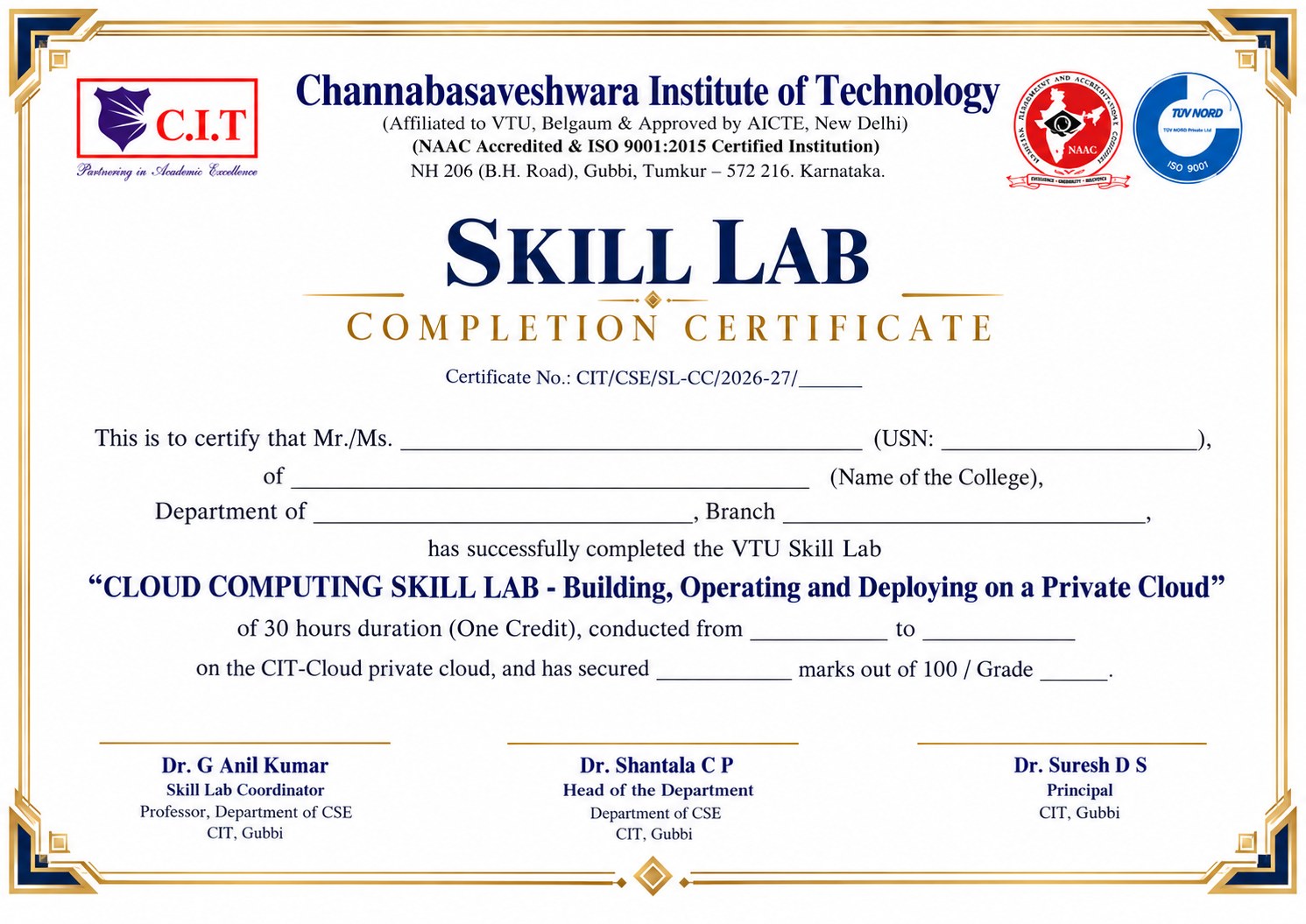
Every certificate carries a unique certificate number and states the Skill Lab title, duration, credit, batch dates and result. It may be issued jointly with an industry partner, where applicable.
VTU Skill Labs — What Every Student Should Know
Summary of the VTU notifications and circulars on Skill Labs
In line with the National Education Policy (NEP) 2020, AICTE guidelines and the Skill India Mission, VTU has introduced Skill Labs as a mandatory component of the B.E./B.Tech. curriculum from the 2025 Scheme onwards (VTU Notification dated 15.07.2026). Skill Labs strengthen hands-on training, experiential learning, innovation and industry-relevant skills beyond the regular curriculum.
Mandatory
Completing the prescribed Skill Labs is mandatory for the award of the degree, and they must be completed before the end of the programme.
1 Credit Each
Each Skill Lab runs for 25–30 hours and carries one (01) credit on successful completion.
Outside Class Hours
Skill Labs are held on Saturdays, Sundays, holidays, vacations and summer semesters so that regular classes are not affected.
On Your Grade Card
Successful completion is reflected in the final semester grade card. Not counted for rank, CGPA or vertical progression.
How many Skill Labs must you complete?
| Category | Skill Labs | When |
|---|---|---|
| B.E./B.Tech. admitted in 2025-26 (2025 Scheme, now in 3rd semester) | 5 | 3rd to 7th semester |
| B.E./B.Tech. admitted from 2026-27 (now in 1st semester) | 5 | 1st to 6th semester |
| Lateral-entry students | 4 | 3rd to 6th semester |
| MBA / MCA (2026 Scheme) | 2 | During the programme |
With Skill Labs, the total credits for B.E./B.Tech. under the 2025 Scheme are 165 (regular) and 124 (lateral entry).
Where can Skill Labs be taken?
- University Skill Centres (Centres of Excellence), University Regional Offices/Departments, and University-approved Skill Centres in affiliated colleges.
- A Skill Lab is valid only after formal inspection and approval by the University.
- Skill Labs are exclusively for skilling beyond the curriculum — they are not used for regular course experiments.
- Colleges with approved Skill Labs must also admit students of other affiliated colleges when requested — so non-CIT students are welcome here.
- The Principal submits the list of registered students to the Registrar, VTU.
How are Skill Labs evaluated?
- Project-based components are evaluated like project work; hands-on components like practical examinations.
- Each Skill Lab is evaluated for 100 marks by two internal examiners appointed by the Principal, immediately after completion.
- Marks are uploaded to the VTU portal when called for.
CIT's VTU-approved Skill Centres
Creativity in Engineering – Computational Thinking – Cloud Computing Lab
Department of Computer Science & Engineering. Industry partners: CITRIS (Tumakuru), Eunoia Labs (Bengaluru), Futred Innovation Studios.
Embedded System – Robotics – Industrial Automation and IoT Lab
Department of Electronics & Communication Engineering.
Both Skill Labs were approved by VTU vide letter No. VTU/Aca/A12/2021-22/3691/25 dated 19.11.2021.
VTU references
| Ref. | VTU document | Subject |
|---|---|---|
| R1 | Notification VTU/BGM/Skill lab/1016/2026-27/1736 dated 15.07.2026 | Implementation of Skill Labs for UG and PG programmes under the 2025 and 2026 Schemes, with Skill Lab Guidelines |
| R2 | Circular VTU/BGM/Skill lab/1016/2026-27/3216 dated 18.09.2026 | Inviting applications for establishment of Skill Labs and review of Skill Labs submitted for approval |
| R3 | Letter VTU/Aca/A12/2021-22/3691/25 dated 19.11.2021 | Skill Lab fee of up to Rs. 10,000/- recommended for CIT's Skill Lab facilities |
| R4 | Circular VTU/Aca/2024-25/6155 dated 04.03.2025 | Publication of details of Skill Lab facilities of affiliated colleges on the VTU website |
This page summarises the VTU documents. In case of any difference, the original VTU notification or circular shall prevail.
Skill Lab Registration
Cloud Computing Skill Lab (30 hours, 1 credit) · Department of CSE, CIT Gubbi
Before you register
- Pay Rs. 2,000/- at the Accounts Section, CIT Gubbi.
- Keep your fee receipt handy — you will need the receipt number and date.
- Keep your USN, college details and a working mobile number and email ready.
- Fill in the form carefully. Seats (50 per batch) are allotted on a first-come, first-served basis.
Registration Form
Fields marked * are mandatory
Student Portal
Your personal space for the Cloud Computing Skill Lab
Student Login Coming soon
Login details will be shared after your registration is confirmed.
What you will find in the portal
Registration status
Seat confirmation, batch allotment and fee verification.
Batch schedule
Your Saturday dates, timings and announcements.
Lab manual
Step-by-step handouts for all 12 programs.
Attendance & results
Hour-wise attendance, marks and certificate download.
FAQ & Contact
Have a question? We are happy to help.
?Is this Skill Lab mandatory?
?I am not a CIT student. Can I join?
?I am not from Computer Science. Can I still take it?
?Do I need a laptop, an AWS account or a credit card?
?When are the classes held?
?How much is the fee and how do I pay?
?How many seats are available?
?What if I miss a session?
?How will I get the credit and certificate?

Dr. G Anil Kumar
Channabasaveshwara Institute of Technology, Gubbi
Venue
- CSE Skill Lab, Department of CSE
Channabasaveshwara Institute of Technology
NH-206 (B.H. Road), Gubbi, Tumakuru – 572 216, Karnataka - Open in Google Maps